Brown-Paper Gothic Vignette
An illustration style reference with a customizable AI art prompt.
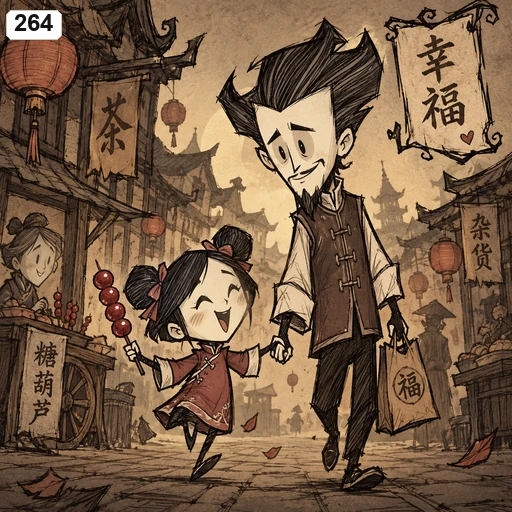
A style reference, not a generated result for your topic. Save reference image.
What defines this style?
Angular thin figures with enlarged heads use rough hatching; brown aged paper and woodcut-like shadows create an eerie but readable little narrative. Use line density to distinguish values and materials while preserving a readable silhouette. Reduce background texture so the image does not collapse into uniform gray.
Customize your illustration prompt
Create a standalone editorial illustration.
Subject and scene: A person finding a quiet moment in a busy day

Visual direction: Angular thin figures with enlarged heads use rough hatching; brown aged paper and woodcut-like shadows create an eerie but readable little narrative.
Rendering and composition: Use line density to distinguish values and materials while preserving a readable silhouette. Reduce background texture so the image does not collapse into uniform gray.
Content: Let the subject determine the characters, action and setting. Turn abstract emotion into a visible gesture or object relationship with one clear focal point. Do not mechanically copy the example's character, clothes or props.
Constraints: Avoid digital soft focus, plastic surfaces and indiscriminate dense hatching. Do not add numbers, signatures, watermarks or unrelated lettering. Include text only when the subject explicitly specifies an exact short phrase.No signup or generation credits required. Paste into your preferred image tool; results vary by model.
How to use this style
Start with one subject, one action and a setting. Keep the visual characteristics above, then change the scene to suit your story. For a fair comparison, use the same scene when trying another style.
The sample image is a reference for linework, palette and composition. Its characters and objects do not have to appear in your result. If your image tool accepts references, check its usage rules before uploading an image.
Read the illustration prompting guide for a worked example and ways to refine a result.